Monday, January 28, 2013

REVIEW: Tt eSPORTS MEKA G-Unit Mechanical Gaming Keyboard


Review: Tt eSPORTS MEKA G-Unit Mechanical Gaming Keyboard
By: Christopher “Synther” Wilson


Generally, peripherals are something that a lot of people take for granted when it comes to the computer world.  Keyboards, mice, and especially headsets are often bought on the cheap because people figure, “Well, a keyboard is a keyboard and if the headset makes sound, it works…right?”  Gamers or anyone that spends a lot of time in front of the screen know that this is not right and we take special care in selecting the best equipment.  It is important to us that a keyboard be comfortable, responsive, and provides us with a few extra little perks.  A mouse usually has to be comfortable and have more than just two buttons and a mouse wheel.  And don’t get me started on headsets…they better have good sound or you can just go home.  The MEKA G-Unit by Tt eSPORTS definitely fills the gamer/enthusiast need for a keyboard that does a little extra.

When computers first came on the scene, all the keyboards were mechanical.  They were built to last the test of time and, as such, many of those old keyboards are still around today.  And they still function perfectly, I might add.  At some point, manufacturers started putting out membrane keyboards and the market got flooded with them for many years.  So much so, that many computer users of the current generation likely have no idea of what it is like to type on a mechanical keyboard!  My guess is that the reason that these membrane keyboards came about in the first place is that they’re cheaper to mass produce.  Unfortunately, it doesn’t appear that this cost savings trickled down to the gamer consumer, since a lot of these membrane keyboards sell for close to the same amount as a mechanical keyboard!

At any rate, mechanical keyboards are back on the scene in a big way and consumers now have a choice between mechanical and membrane keyboards.  Some people, like me, enjoy the responsive feeling of the mechanical keys and don’t mind the slightly louder noise.  Others prefer the softer touch and quiet of a membrane keyboard.  As usual, I did research before purchasing the MEKA G-Unit and I read a lot of other reviews.  I saw several people claim that typing on a mechanical keyboard is so loud that it can keep people in other rooms awake.  This is complete and total hogwash.  Unless you live with the Bionic Man or your roommates have dog ears, there is no way that the typing on a mechanical keyboard is keeping someone in another room awake.  Talk about over exaggeration and a desire to sound dramatic.  I prefer to keep that kind of ridiculous behavior out of my reviews, thank you very much.

While slightly more expensive than a “standard” membrane keyboard, the Tt eSPORTS MEKA G-Unit is well worth the money and is loaded with extras.  I purchased the MEKA G-Unit to replace a 4.5 year old Logitech G19 and I was looking for something that had a similar layout for the macro keys.  While flashy in appearance, the LCD screen was not something that was important to me since I found myself rarely looking at it during gaming.  Having had really good experiences with Logitech in the past, I chose to not purchase the G710+ because of a lack of back lighting and the literally anemic attempt at the macro keys.  Naturally, the next choice was something by Tt eSPORTS, since ThermalTake has been extremely good to me.  I was not disappointed in this purchase in any way.  Upon opening the box, I was literally in awe at the number of little extras that Tt eSPORTS had chosen to include.

Right out of the box, the MEKA G-Unit is screaming, “Pack me up and take me to a LAN!”  Tt eSPORTS put a lot of thought into the design of this ‘board and it is ready for travel.  The keyboard’s cable actually unplugs from the keyboard itself, has a Velcro cable tie on it, and Tt eSPORTS included a small velvet pouch for storage when packing up for travel.  No more wrapping your cable around your keyboard and having to be extra careful to not damage the connection when you go to a LAN.  This is a feature that should be included on every enthusiast level keyboard ever made.  I’m not sure why it has taken so long for this to come about!  They also thought ahead and included a case for the keyboard itself.  The case secures closed with Velcro, is bifurcated to include your removable palm rest, and has a small pocket to put the velvet cable pouch in.  Everything secures into one, very durable, easy to carry case.

Something to think about is that this keyboard is quite heavy.  Not that you’ll break your back carrying it or that this is bad in anyway, but it simply feels extremely sturdy and durable in your hands.  The bottom of the keyboard has the standard rubber feet, but Tt eSPORTS went a step further and put rubber feet on the folding legs too.  This is the first keyboard I’ve ever seen to have this feature and it is extremely nice.  This ‘board isn’t going to slide around once you place it on your desk.

Setting the keyboard up, I immediately downloaded and installed the latest software (Tt eSPORTS includes a software CD, but I always download the software for any peripheral to make sure that I have the most recent version).  The software does not feel cluttered in anyway and gets straight to its purpose of function.  Macros are easy to record and even a total n00b will be able to setup keys for macros in a matter of minutes.  The macro record function works exactly the same as it does for the Tt eSPORTS Level-10M Gaming Mouse.  So, if you are familiar with one, you should have no problem using the other.  Also just like the Level-10M, macros are actually stored to the keyboard itself!  This means you can unplug your MEKA G-Unit, plug it into another computer (such as a tournament system) and still have all your macro keys!  The keyboard stores up to three separate profiles for a total of 36 T-Keys.  The software includes a button for “Instant Shift System.”  This allows you to set the keyboard to switch over to Profile II or Profile III by pressing Shift, ALT, or CTRL and thus allows you to quickly reach all 36 T-Keys without having to press the profile buttons at the top left of the keyboard.  I noted that the help document for the software states that it will allow you to “reach all 60 T-Keys,” but I’m at a loss as to how 12 T-Keys x 3 Profiles could possibly equal 60.  It’s possible that I’m missing something but it looks like somebody didn’t do their math right.

 In addition to setting up macros, the software also allows you to setup single key replacement functions.  For instance, if you want to set T-9 to access your inventory in Dungeons & Dragons Online, you can use the Single Key function to set T-9 to be the I key.  This is something I really wish that Tt eSPORTS would add to the Level-10M software, as well (hint, hint…hello developers, are you listening??).  You can also set a T-Key to launch a program of your choice.  Let’s say you want to be able to launch TeamSpeak 3 while you’re already in Dungeons & Dragons Online.  Simply set the T-8 key to launch ts3client_win64.exe and you’re ready to go.  This can be extremely useful.
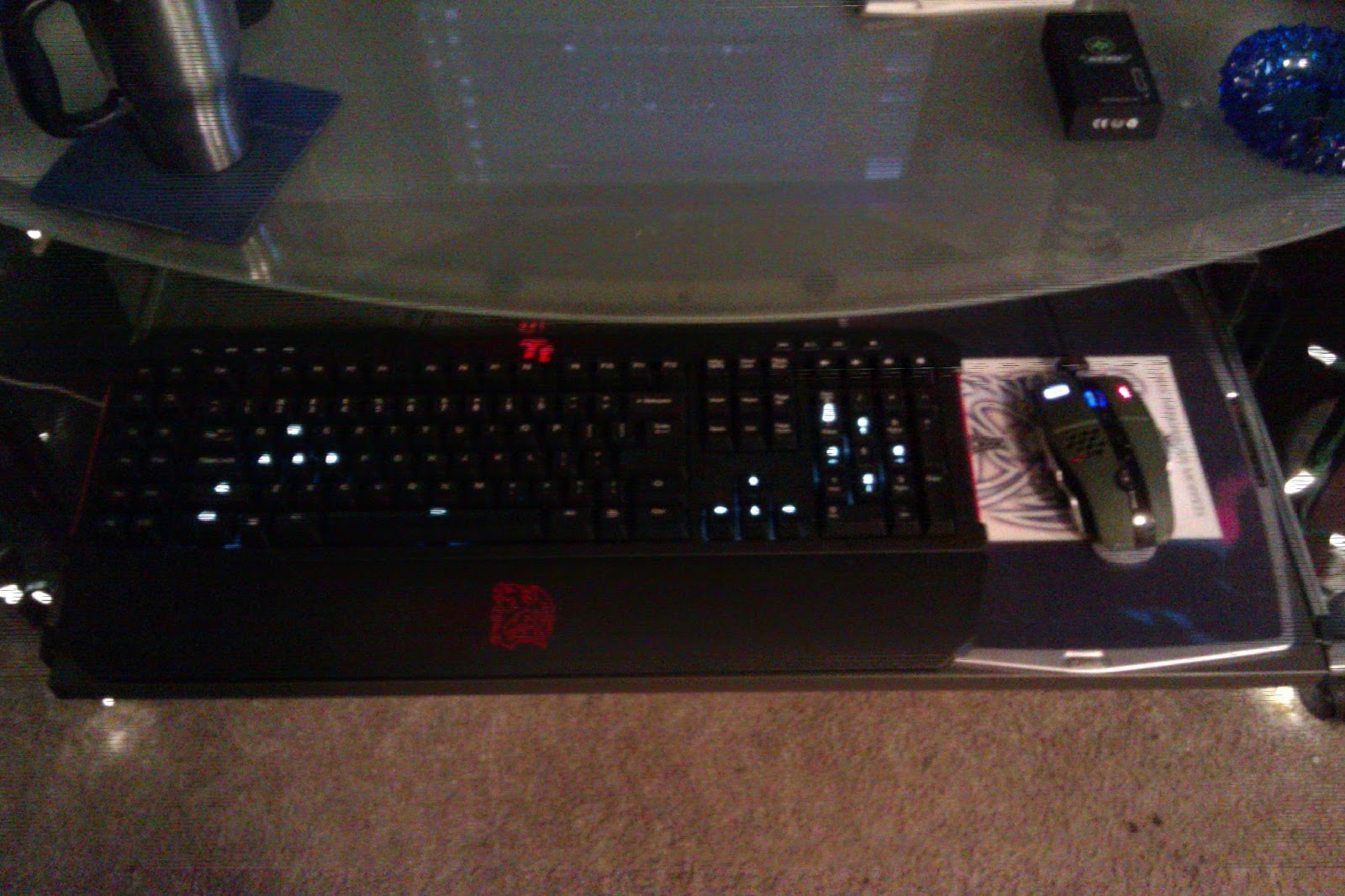
So you may be asking yourself how the keyboard actually functions as far as…you know…a keyboard.  The only answer I have to this is: Like a dream.  The keyboard has a 1000Hz polling rate and coupled with the fact that the keys actually activate about half way down without bottoming out means that the responsiveness of this keyboard is phenomenal.  When testing the MEKA G-Unit out in Borderlands 2, the reaction time from the keyboard was so fast that I could almost swear that it was reading my mind.  In Dungeons & Dragons Online, the T-Keys performed their function perfectly for macros that I had setup for weapon switching, potion drinking, and hireling spawning.  In FireFall, the media keys kept me happy switching forward and back in songs in Windows Media Player and I was able to keep the wub wub going non-stop.  The Normal/Game Mode button is very nice too and allows you to disable the Windows keys.  And the detachable palm rest is comfortable without being too large and without having any style curves in it to prevent it from adequately performing its function.  From an ergonomics view point, I can sum up the MEKA G-Unit in one word: Comfortable.

The one and only downside that I can find for the Tt eSPORTS MEKA G-Unit is the back lighting.  And really, it’s not that much of a gripe.  Rather than back lighting all of the keys, Tt eSPORTS added white LED back lighting to WASD, left-Shift, Left-CTRL, Space, arrow keys, and 8462 on the Numeric Pad.  Num lock and Caps Lock have their own lighting, as well, to indicate On/Off status.  The Tt logo also calmly pulses red.  All of the other keys on the keyboard are dark.  If it were me, I’d have chosen a slightly different lighting setup with keeping the white LED lighting on the current keys but also adding white LEDs to the T-Keys, then back lighting all of the rest of the keys with red LED lighting.  Mostly, this would be for aesthetic reasons, though…I just think it would look freaking sick.  As it stands, the lighting on the keyboard is enough to guide your hands in the dark to your home keys by lighting up three different zones.  Lighting is currently available in five different options: Off, low, Medium, Bright, and Pulsing.  Pulsing will fade the keys on and off slowly and shouldn’t cause you to have a seizure.

If you are in the market for a new keyboard, want to get in on the mechanical keyboard revolution, or just need to upgrade the keyboard you presently have, you should really consider the Tt eSPORTS MEKA G-Unit.  I give this keyboard an easy 9/10 and it would be a solid 10/10 if the ‘board had full back lighting.  The keyboard I purchased is the standard Tt eSPORTS black with red highlights, but I’ve seen that they are coming out with this keyboard in military green and white, as well.  So if you are looking to color coordinate your peripherals, you shouldn’t have a problem.  Aside from gaming, if you use your keyboard a lot for…you know…typing…this is also a good purchase.  I’ve actually seen my words per minute go up with fewer errors!  The Tt eSPORTS MEKA G-Unit is worth every penny and then some.


Friday, January 25, 2013

REVIEW: AquaVaporCig PRO DSE901 PCC eCig Starter Kit


Review: AquaVaporCig PRO DSE901 PCC Electronic Cigarette Kit
By: Christopher “Synther” Wilson


Some may wonder why I would be doing a review on an electronic cigarette kit and lump it in with my regular reviews of computer hardware and games, since these things seem fairly unrelated.  In reality, I find that they are extremely related since there is a good percentage of computer IT people that smoke.  And a good percentage of those people are also gamers.  The old saying at many corporations I’ve worked at was that if you had a question you couldn’t find an answer to, go out to the smoking area and you’ll get 20 new answers to help you out.  This was the complete truth, too.

Having smoked menthol cigarettes for close to 25 years, I’ve recently decided that it was time to think about getting off of tobacco.  Quitting is difficult since the nicotine gum tastes like crap and the patch irritates my skin.  And neither of these is smoking!  Which is the hardest part since I freaking love to smoke.  The alternative is the electronic cigarette.  You can continue with the vice you love without burning tobacco and the related chemicals involved with it.  Because it is not burning any tobacco, the eCig can sometimes be used in locations where traditional smoking is not allowed as well (be sure to ask or kindly put it away if you are asked to stop).  And yet another benefit is that you can get the liquids in excellent flavors!  This is something that the FDA took away from smokers, which is stupid.  They claimed that “Strawberry” flavored tobacco, for instance, was catering to children and those under the legal age (note that I say both children and those under the legal age…that’s because, I’m sorry, but 15 years old is NOT a child).  But at the same time, they don’t try to claim that “strawberry” flavored Vodka is catering to children or those under the legal age.  Ultimately, it comes down to the government telling me that it is apparently ok for me to poison my body one way but that it is socially unacceptable to do it in another way and they’ll use the guise of “public health” to argue it.  Ridiculous.  Keep in mind that we, the IT people, keep your society, life, and corporations running.  A good percentage of us smoke (and drink obscene amounts of coffee and energy drinks).  Don’t make an attempt to take away our nicotine (or caffeine) or we may decide to no longer part with our arcane knowledge to keep all the crap you rely on running.  Something you anti-smokers might want to consider.  You need us and literally cannot live without us.  Do not piss us offWe.  Are.  Legion.

“So, Synther, how does the electronic cigarette work?”  Asks the uninitiated.  The electronic cigarette uses a battery and atomizer with a heating coil to heat up eJuice, or smoke juice, liquid that contains nicotine.  The vapor that is produced is then inhaled and is very similar to a normal smoking experience.  How the liquid is loaded into the eCig depends on the model you purchase, but there are basically three models.  The first is the two piece design.  This design is the one you are seeing the new TV commercials about by Blu and is very close in size to a real “analog” cigarette.  This consists of a battery unit and what is called a Cartomizer.  The Cartomizer is a single piece that contains both the cartridge and the atomizer, hence the clever name.  Cartomizers have the benefit of holding a good amount of eJuice and are compact.  Some companies market their Cartomizers as disposable and when used in this manner, you get the side benefit of a fresh atomizer every time you replace the Cartomizer.  In reality, every brand of Cartomizer can be refilled.

The next type of eCig is the three piece design.  These can range in size to being about the same size as a regular 100 style analog cigarette all the way up to being about the size of a good cigar.  Generally, the size is directly related to how long the battery is going to last you.  In a three piece design, you have the cartridge containing the eJuice, an atomizer unit, and a battery.  The benefit of these is that you can get a lot of good options with them and many can also use Cartomizers to turn them into a two piece design or use a tank for much longer “vaping.”

The last type is what is referred to as a “Mod.”  These generally do not look like cigarettes at all but have some crazy capabilities.  These will usually use a tank system, such as a Clearomizer and have an extremely long battery life.  One example would be the new Joytech eVic, which has an LCD screen that shows information on how much liquid is left, battery life, and even the number of seconds of your average draw.  It can then be plugged into your computer and this information can be tracked!

After doing what literally amounted to weeks of research, I settled on a DSE901 model eCigarette.  This is a three piece design with a lot of options in the future and is about the same size as a real cigarette but is just a little longer.  Price ranges can vary widely, but the best deal I found was at AquaVaporCig.com.  Their PRO DSE901 PCC kit offers two batteries in your choice of automatic or manual push button, two atomizers, five pre-filled cartridges, a free 10ml bottle of eJuice in your choice of flavors, a USB charger and wall adapter, and a PCC (Personal Charging Case).  I felt that my choice in this particular kit was important since the idea of not smoking real “analog” cigarettes any more is a rather major life change after doing it for so long.  I wanted it to be as close to my real habit as possible or else I would undoubtedly fail in my endeavor.  The PCC is close enough feeling to a real cigarette case that it feeds the habit of reaching into my pocket for the pack all while serving the purpose of charging a dead battery for me.  I chose to go with manual batteries due to the fact that I would like to try direct dripping and manual batteries are sealed.  Direct dripping is where you drop one or two drops of eJuice directly into the atomizer and should be good for eight to 10 puffs.  If some of the liquid leaks out into an unsealed battery, you can ruin the battery!  There was a simple mistake and what were shipped to me were automatic batteries.  Because it was later in the evening, AquaVaporCig was closed, so I left them an email to resolve the situation.  Even late after hours, they immediately contacted me telling me to keep the two batteries I have as spares and that they are shipping me the manual batteries first thing in the morning.  True to their word, I received an email the following morning confirming that they shipped out the new manual batteries.  It's one thing to have a well stocked business with good prices but it is another to have excellent customer service.  And AquaVaporCig has customer service in droves!  If you’re thinking of going with an electronic cigarette, parts for an eCig, or want to buy some eJuice, I would recommend them just on their customer service alone.

The other reason I wanted a manual battery was because I had found the draw on other brands of automatic batteries to be a little tight.  I didn’t want to feel like I was sucking in my cheeks just to get a drag off my cigarette.  I was pleasantly surprised that the automatic batteries on the PRO DSE901 are not like that at all!  It is a very pleasant and easy draw.  The atomizer works extremely well and the eCig produces good flavor and vapor overall.  Since it is new, I used the DSE901 a little more than I would normally smoke but I still found that the battery was good for a little over two hours.  I selected high nicotine (24mg) menthol flavor for my prefilled cartridges and high nicotine (24mg) Strawberry flavored eJuice for my free 10ml bottle.  Because AquaVaporCig.com has a 10% discount code to use if you are switching from “analog” cigarettes to electronic cigarettes, I saved some money on the overall purchase and ordered some extra flavors of Low Nicotine (11mg) Butterscotch and their new AquaVMax line of liquid in High Nicotine (26mg) Cocoa Mint.

The cartridges for the PRO DSE901 are what are known as a “whistle tip.”  This is almost exactly like you would find on a Swisher Sweet Cigarello.  At first, I didn’t think I was going to like this tip because it wasn’t enough like a real cigarette.  However, I found that the whistle tip works perfectly with the PRO DSE901 and aids in gripping it in the mouth in a comfortable fashion.  It has been said that for flavor, you’ll never find an exact match to “analog” cigarettes.  I somewhat disagree with that, but in the case of the 24mg Nicotine Menthol that was prefilled in these cartridges it is pretty close to true.  Instead of tasting like a true menthol cigarette, these taste much better and are a lot like the flavor of a stick of Wrigley’s Double-Mint gum (a comedian once stated the truth when he said, “if cigarettes tasted good, why don’t we see Marlboro flavored ice cream?”).  I found them to be quite enjoyable and the 24mg strength to be just about perfect for what I was looking for.  Vapor production is pretty average with the prefilled liquid and about the same that you would see with a real cigarette.

I admit that the flavor I was really excited about was the AquaVMax Cocoa Mint 26mg.  As I stated, many will tell you that it is impossible to match an eJuice flavor with any real “analog” cigarette.  In this case, that claim is completely untrue.  The AquaVMax Cocoa Mint, to me (I realize that taste is very subjective), tastes exactly like a Camel Jade.  It has that perfect mix of menthol mint flavor on the inhale with a very chocolaty flavor on the exhale.  The AquaVMax flavors come in a little bit stronger strengths than AquaVapor’s Premium eCig Liquids and I didn’t think that the 2mg difference between 26mg and 24mg would really matter.  I was wrong.  26mg is a little too strong on the throat hit for me and the next time I order this flavor; I will definitely get it in the 18mg strength.  I found that this seems about twice as strong as one of my regular rolled “analog” cigarettes.  The other thing to note about the AquaVMax line is that they are made with a 50/50 mix of Polyethylene Glycol (or PG, a common component found in food products and cosmetics) and Vegetable Glycerin (or VG).  VG tends to be a little thicker than PG but produces more vapor, while PG is known to carry the flavor additive better.  The 50/50 mix of the two seems perfect for good flavor and large amounts of vapor production.  Notice I did say “next time I order this flavor,” because I can definitely see this flavor being my regular all day vape.  It is absolutely delicious in every way and I will be ordering this again!

Charging the battery of the PRO DSE901 is a very simple process, especially if you’re a technogeek that is in front of your computer all the time.  Simply plug the USB charger into an available USB port on your computer (or use the supplied wall adapter), screw in the battery until the light on the charger goes red, and you’re charging.  When the light on the charger turns green, the battery is charged and ready to be used.  Alternately, you can use the PCC pack to charge your battery as well.  The PCC is used when you’re out and about and you need to charge your battery.  It also holds a fully charged battery with an atomizer on it and five cartridges.  This one pack should have you set for an entire couple of days of vaping!  To charge your battery using the PCC, screw the battery into the second hole from the left and press the button on the front of the case.  The LED light will turn on and go to red.  When the light goes to green or turns off, your battery is charged.  Alternately, you can leave the spare battery in this slot unscrewed for storage.  Pressing the button on the front of the PCC will then show you the battery level of the PCC itself.  This pack is great!  The charge on the pack is good to recharge your batteries about 10 times total!  The pack is easy to charge and comes with its own USB cable that can be used with the wall adapter or plugged into your computer as well.

The one extremely minor gripe that I have with the PRO DSE901 is that the PCC will not hold a fully assembled eCig if you are using the atomizer and cartridge.  Instead, you have to remove the cartridge each time to put it away and put the cartridge back on when you want to vape it (vaping is the term to use instead of smoking).  However, if you decide to use Cartomizers with your DSE901, this is not the case and the pack will hold a fully assembled eCigarette.  The Cartomizers I’ve tried in the past on other brands had a tougher draw and I just didn’t like them as much.  Having said that, the quality of the merchandise from AquaVaporCig is so good, I may purchase a pack of Cartomizers from them anyway since it is very likely that I’ll find a much better experience!

In all, I am extremely pleased with AquaVaporCig.com and with their PRO DSE901 PCC Kit.  It should be noted that when shopping for a DSE901 starter kit, all of the others that I found only came with one atomizer, did not offer any free liquid, and were usually about $10 more in price.  AquaVaporCig.com has a good product with excellent pricing and they completely back it up with phenomenal customer service.  Whether you’re a first time buyer of an electronic cigarette or looking for new flavors and parts, you should definitely check them out.  And if you are switching from analog cigarettes, be sure to use the discount code of “switch” in your cart to get your 10% discount on your total purchase!

Saturday, January 19, 2013

REVIEW: Tt eSPORTS LADON Gaming Mouse Pro Mouse Mat


Review: Tt eSPORTS Ladon Gaming Mouse Pro Surface

By: Christopher “Synther” Wilson


I’ve said in the past that I dislike cloth or foam based mouse pads.  They feel cheap, the edges start to fray after awhile, they seem to pick up every speck of dirt and stain in a 10 mile radius, and they tend to feel like you’re dragging your super fast mouse through three day old pudding regardless of how high you set the DPI.  And I’ve never found a cloth mouse pad that could even remotely compete with a solid mousing surface.  Tt eSPORTS LADON Gaming Mouse Pro mouse mat changed my mind completely on all of that!

The LADON does not feel cheap in any way.  Tt eSPORTS stitched the edges of the mat to prevent fraying and give your investment some longevity.  The actual surface is an extremely tight weave, rather than a cloth and foam mix, like other soft mouse pads.  This weave gives the surface a very smooth glide for your mouse.  And the tracking!  The tracking on the LADON is simply amazing with dead on accuracy that literally has to be used in a game to be believed.  The tracking works equally well in MMOs or in shooters and I tested the LADON out in the Defiance beta.  With such smooth tracking, aiming and movement was a breeze.  The Battle Dragon insignia and other print isn’t raised either, so you never lose any tracking on the surface.

The size of the LADON is a bit big at 360mm x 300mm x 3mm.  However, because of how thin the mat is, it shouldn’t be a concern to have part of your keyboard overlap the mouse mat.  I didn’t generally feel like the LADON was attempting to take over the entire area of my desk like a lot of other large mouse surfaces.  Still, I think that Tt eSPORTS could perhaps make a version that is slightly smaller.  Not a huge beef, but it would be a nice option.

The bottom of the LADON is a non-slip rubber base.  This mouse mat stays put when on your desk and you won’t have to worry about it sliding around.  I feel that this is actually aided by the large size of the mouse mat, as well.  There’s simply a lot of this rubber to get a firm grip on your desk and this may have contributed to Tt eSPORTS decision to make the mat so large.  It has a big foot print that is all the better to get a grip with.

One of the benefits of a cloth mouse pad is in its ease of transport.  Not to say that a solid mousing surface is difficult to pack up, but a cloth mouse surface can be rolled up and takes less space in your LAN bag.  This way you can have more space for extra cans of Monster Energy Drink!  The LADON easily rolls up for transport to your favorite LAN party.  Because of the cloth weave surface, I did notice that you may have to roll the LADON in the opposite direction to get it to lay flat if it is rolled up for too long.  This is definitely not a hindrance but is something that is worth noting.

In all, I would say that the Tt eSPORTS LADON Gaming Mouse Pro surface has completely changed my mind on cloth mouse pads.  In fact, it is the first cloth mouse surface that has gotten me to reconsider my solid mousing surface that I presently use!  The price won’t set you back to badly, either.  If you’re looking for a new mousing surface with some absolutely amazing tracking abilities, you shouldn’t have to look any further than the Tt eSPORTS LADON.


Friday, January 18, 2013

REVIEW: Func Industries 1030 sUrface Archetype MBA


Review: Func Industries 1030 sUrface Archetype MBA Mousing Surface

By: Christopher “Synther” Wilson

The number of mouse pads, or mousing surfaces, available today literally boggles the mind.  You can literally find them in every price range from your local Dollar Tree to some really fancy models at Best Buy or available online.  On surface inspection (I couldn’t resist…I’m a punny guy) you will find that they all essentially perform the same function.  With a deeper look at them, you can find that some are a far superior product over others.  The Func 1030 sUrface Archetype MBA definitely falls into the “really fancy model” category.
This is actually the second mousing surface that I’ve owned from Func, with the other one being a sUrface 1030 Original.  The two are very similar with the Archetype MBA offering a few extras.  You might be saying, “Synther, it’s a mouse pad…what extras could you be speaking of?”  Well, the first being that the 1030 sUrface Archetype MBA that I have uses a machine billeted aluminum base (hence the MBA in the name).  I’m not sure that this is available any more but the current legacy model you can order from Func.net does use a soft-feel hard plastic base.  I’ve found that the hard base is an improvement over the soft rubber base sleeve of the sUrface 1030 Original.  The hard base always provides a solid surface no matter what you set it on.  There have been times where tables at LAN events weren’t quite as even or smooth as I would have preferred and I could literally feel some of the imperfections through the soft rubber base of the 1030 Original.  The Archetype solves this problem beautifully.

The other thing that is nice about the 1030 sUrface Archetype is the size.  At 11.5” x 9.5” I’ve found that the size is just about perfect without being too overly huge but is still 20% larger than the 1030 Original.  I’m not sure what the thought process of current mouse surface companies is, but I have never once thought to myself, “Synther…you know what you need?  You need a mouse pad so freakishly huge that it covers ¾ of your entire desk.  Yep, that would make life grand.”  Something like the XFX Warpad at 16.97” x 13.98” and requires a clamp to attach it to the desk is simply absurd, in my opinion.  Even if you were doing plotting or graphics arts, you will be extremely hard pressed to convince me that a mouse pad that insanely huge is going to be some kind of benefit to you.  But to each their own.

The actual mouse surface on the Archetype is a double-sided inset.  On one side, you’ll find a nice textured surface.  On the other, you’ll find an extremely smooth surface.  If you’re looking for raw speed and glide, the smooth surface is for you.  I tend to prefer the textured surface since I find that the precision tracking on the mouse seems to be a little bit better and I don’t seem to get the feeling of running over literally every particle of dust that happens to land on my mouse pad.  The surface is easily taken out to flip over or clean via two holes in the bottom of the base.  I’ve used two different mice with the 1030 sUrface Archetype and I’ve found that both track equally well.  I’ve read some reviews on other mouse surfaces where people claim that one type of mouse will track better on a particular surface than another.  I honestly believe that this is likely a psychological effect and has no real basis in truth unless there is some defect or major settings change with the particular mouse.  Both my Logitech G500 and ThermalTake Level-10M mice track equally well at 3500dpi on the 1030 sUrface Archetype.
The standard 1030 sUrface Archetype comes with a black mousing surface.  You may be wondering how I got a custom logo on mine, since this is not something that is currently available through Func.  The simple answer is that it wasn’t easy.  At the time that I ordered this Archetype, Func’s website was down.  I had to order through one of their manufacturing partners, ACT-Labs.  At the time of this writing, ACT-Labs does not appear to be offering the custom print any longer and it is currently not offered by Func.  However, in a recent conversation with Calle from Func Industries, he let me know that Func is currently looking into ways to decrease the minimum order quantity on custom prints to make it a viable option for their customers.  So, you might want to keep an eye on Func.net in the future to see if this option is once again available!
The bottom of the 1030 sUrface Archetype holds six round soft rubber feet to keep the base from slipping around on your desk.  For the most part these feet work extremely well, though I have noticed a bit of slip on my glass top desk.  Newer versions of Func mouse surfaces have resolved this by adding larger feet.  However, I’ve found that overall the Archetype stays where you put it and doesn’t slide around a great deal.

Func Industries has been around since 1999 and they came out with such a solid product in the 1030 sUrface Archetype that it suspiciously looks like Razer’s recent Invicta aluminum base mouse surface is almost a direct copy of Func’s award winning design.  In addition to mousing surfaces, Func also offers a liquid that you can use to add even more anti-friction to your surface.  Func Liquid is non-toxic and water based, containing no wax.  Simply apply it with the cloth and let your mouse surface dry.  I can tell you from experience that Liquid will leave your mouse surface as slick as ice!  I highly recommend it and it will work on any solid mousing surface.
If you’re in the market for a new mouse surface, I highly recommend that you take a look at Func Industries.  They’ve been in the business for some time and they know how to make a good mousing surface.

REVIEW: ThermalTake TR2 Series PSU


Review: ThermalTake TR2 600w and TR2 500w Power Supply

By: Christopher “Synther” Wilson

From a consumer stand point, the modern world of power supplies can be fairly confusing.  On the one hand, you have a gazillion fanbois screaming that one PSU is fantastic and another sucks; on the other hand you have the certification process that is supposed to tell you what really is good and what is not.  In reality, there are only five or six different manufacturers of the internal parts of PSUs in the world and only three or four of those are making good ones.  Add to that the certification process that was originally meant to mean something with its procedures and guidelines that now means exactly jack because every PSU with a power cable is able to get certified and you start to see the confusion.  And finally, you have a lot of consumers that are woefully ignorant on what their actual power needs are to begin with.

I won’t begin to tell you which models are or are not good purchases for your needs.  There are much better reviews from people that have done a lot more research on the topic than I for that purpose.  What I can tell you is that ThermalTake has been in the business of power supplies for quite some time and they have always had a reputation of providing a good product.  The TR2 500W and TR2 600W are perfect examples of this lineage.
I received the TR2 600W to replace an aging RaidMax 630W in my current gaming system, “Vindicator.”  The TR2 500W was received to aid in building a new file and TeamSpeak 3 server.  I received both of these power supplies about two weeks before Christmas, but I wanted to hold off writing the review so that I could monitor their function and determine if there were any power ripples.  I know that some are laughing and calling me a n00b for having had a RaidMax PSU.  That’s fine.  But be aware that while there was always a small ripple in that power supply, it has been overall a rock solid performer for almost five years.  On the flip side, it was originally purchased to replace a dead ULTRA 800W with FSP guts that only last roughly 1.5 years.  The ULTRA should have been the better power supply but as you can see; your mileage may vary with just about any PSU that you purchase.

The TR2 500W and TR2 600W are virtually identical in all ways except for the wattage.  Neither power supply carries a certification rating, yet they both operate as a “work horse” in my experience.  Both of these PSUs have the standard 4+4 pin EPS power for the latest models of CPU as well as two PCI-E 6+2 pin connectors for the latest models of video cards.  From a cabling stand point, this means you could plug in two video cards in an SLI or Crossfire configuration.  The reality is that neither of these PSUs carry the wattage really required to do that.  Again, it really depends on what cards you’re running, but if you think you are going to plug in two GTX 670 cards and expect your power supply to live past a month, you’re likely terribly mistaken.  But for a single video card configuration with a Radeon HD 5770 clocked at 900MHz, I’ve found that the TR2 600W works perfectly.


The TR2 500W and TR2 600W are both standard ATX sized PSUs.  I’ve found that in a lot of cases (HAH!  Another pun…) the term “standard sized” can be a bit of a misnomer.  My ULTRA 800W was gargantuan in length, for instance.  This can cause a problem for longer video cards, smaller cases, or a mixture of the two.  The TR2 series is not overly long and should fit into just about any case with ample room left over.  The cables are longer to aid in cable management so you can hide them.  While this may sound good on paper, I’ve found that it can be either a blessing or a curse depending on the case you’re putting the PSU into. In my AeroCool AeroEngine II case, the longer cables worked great, however.
After installing, I jumped the CMOS and went back in to set my overclock.  I have my Core 2 Quad Q9550 running at 3.23GHz with 1.32v and cooled by a ThermalTake WATER 2.0 PRO closed loop liquid cooler.  A review of the WATER 2.0 PRO can be found here..  In use, I’ve not found there to be the power ripples that I noticed with my RaidMax 630W PSU and the overall power has been extremely steady and stable.  The TR2 series has the added benefit of providing over-voltage, over-power, and short circuit protection as well.  Something that the RaidMax either did not provide or did not advertise.

ThermalTake has added one more bonus for the TR2 series power supplies by sweetening the pot with a five year warranty.  Bang for buck, this is definitely something that can add to your peace of mind and is usually only something you find on the higher end models of PSU.  Once again, ThermalTake has gone the extra mile in taking care of their customers.
Ultimately, I’m going to give the TR2 500W and TR2 600W power supplies a solid 10/10.  They do exactly what they are meant to do with no muss and no fuss.  They do not have fancy LED lighting or plug into a USB header on your motherboard to give you updates on a software gadget that you’ll use only once or twice in your entire life.  What they do is give you good solid and stable power, which is what we want from a PSU to begin with.  If you’re running some heavy metal in a crossfire or SLI configuration, you should definitely look at getting a more powerful PSU with more wattage.  But if you just need a solid PSU for an average gaming system, the TR2 600W should fit most of your needs.